Build an AI-powered orchestration and support stack
By Maxime Larrieu-Panini, Fullstack developer & cloud consultant ·
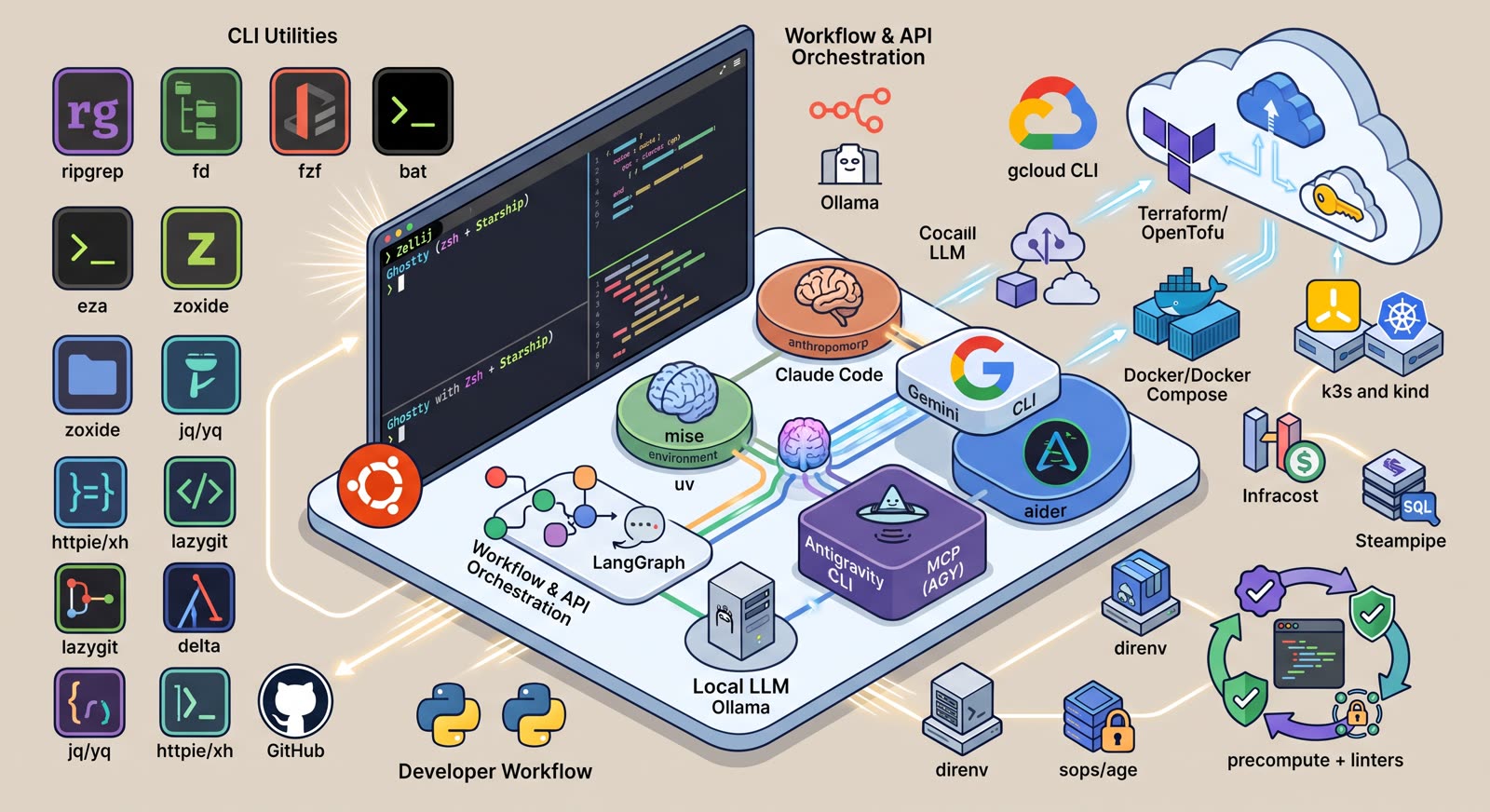
Linux has always sparked my curiosity. Less for the operating system itself than for everything you can install on it: the tools, the packages, this entire open-source ecosystem discovered one need at a time.
The issue was that I used to switch operating systems every few weeks, indulging in the somewhat masochistic pleasure of starting over from scratch. That meant re-downloading, reconfiguring, and reinstalling. Every single time.
What I was missing was not one more tool; it was system portability. A stack that follows me, completely identical, from one machine to another.
This article outlines the tools I settled on, but above all the logic tying them together: a workstation engineered to pilot multiple agents concurrently, fully reproducible through a single script, and version-controlled like code.
The foundation: terminal and system
Everything else lives inside this layer, so it pays to choose it carefully.
- A modern terminal: Ghostty (fast, GPU-accelerated), paired with zsh + Starship for the prompt.
- Terminal multiplexer: Zellij, essential when running long-running agents. You detach the session and return to it later (with the option to pin floating panes or not).
- Modern CLI utilities:
lazygit, a great recent discovery—a lightweight Git interface makes everyday tracking a breeze—alongside others (fd,fzf,bat,eza,zoxide,jq/yq,xh),deltafor readable git diffs, andatuinto back your shell history with a SQLite database. - Language runtime management:
mise(asdf successor), a single tool to manage Node, Python, Go, Terraform, etc. uvfor Python (an ultra-fast replacement for pip/venv/poetry) andbunon the JavaScript side.
Everyday CLI utilities
These are drop-in replacements for legacy commands, running faster and providing clearer output:
fd(file search),fzf(fuzzy finder that plugs into everything),bat(syntax-highlighted cat),eza(modern ls), andzoxide(smart cd that learns frequent directories).jqandyqfor JSON and YAML manipulation,xhfor fast HTTP requests.deltato turn git diffs genuinely readable.lazygit, a more recent discovery: a terminal UI for Git that streamlines daily tracking—line-by-line staging, history navigation, and branch management.tealdeer, a fasttldrimplementation: man pages condensed into three practical examples, which is usually all you need.btopfor system monitoring, alongsidedustandduffor disk usage analysis.
The stance here: stay inside the command line. No distracting graphical interfaces, just what matters and total control over what is happening. Plus, it always looks great (and you get used to it fast, I promise!).
CLI coding agents
Everyone has their own habits, but the real power lies in making them co-exist and picking the right tool for each project or task.
- Claude Code: My primary development driver. I use it for in-depth terminal work: multi-file refactoring, navigating whole codebases. Its system of skills, hooks, and sub-agents makes it easy to tailor per project.
- Gemini CLI: My daily companion. Generous free quotas, and fully aligned with my GCP focus.
- Google Antigravity: Google's multi-agent IDE. Its managed agents can drive a browser: opening pages, reading documentation, interacting with web interfaces. Its CLI,
agy, lets you stay right in the terminal. - Aider: Lighter, and outstanding for targeted, Git-native edits.
The vision: not a single silver-bullet tool, but an orchestrated pipeline where the developer becomes the conductor. In practice, this means Git worktrees paired with Zellij: one agent per worktree tackling distinct tasks without stepping on each other's toes. That is where a terminal multiplexer becomes indispensable.
Agent orchestration and MCP
Connecting these agents to the outside world.
- MCP servers: Filesystem, GitHub, Postgres, Playwright/Puppeteer (browser automation), and dedicated MCP servers for the services I rely on (Notion, Atlassian…). It is the standard protocol to bridge agents to external systems.
- n8n: Self-hosted, the most efficient engine for AI automation: visual workflows combined with AI nodes.
- LangGraph or Google ADK (Agent Development Kit) to build custom agents. ADK aligns naturally with my GCP/Vertex AI orientation.
- Ollama: Running local models for experimentation, sensitive client data, and offline demos.
The goal is full customizability, unified configuration, and tight interconnection: n8n triggers and orchestrates, LangGraph and ADK reason. The two complement rather than replace each other.
Cloud and architecture (GCP-oriented)
This section is optional, although several tools are universally useful. The priority here is having everything required to design and manage GCP architectures:
gcloudCLI without question, along withgsutilandbq.- Terraform: A non-negotiable requirement for Cloud Architects, and prime territory where AI agents shine (module generation, plan reviews).
- Docker + Docker Compose, along with local
k3sorkindto practice Kubernetes/GKE workloads at zero cost. - Infracost: Cost estimates directly on Terraform execution plans.
- Trivy: Security vulnerability scanning for container images and IaC.
- Steampipe: Querying cloud infrastructure using SQL—heavily underrated for architecture audits.
These tools allow you to design production-grade architectures while keeping cloud spending and security risks under control before deployment, not after.
Quality, context, and hygiene
Rigorous scaffolding establishes solid habits and muscle memory early on. It also protects against accidental breakage by enforcing hard guardrails.
direnv+sops/agefor per-project secrets management (no plain-text API keys in agent configurations).- A dedicated context file per repository (
CLAUDE.md,GEMINI.md,AGENTS.md). pre-commithooks + linters (ruff,eslint/biome): agents generate code fast, making automated guardrails essential.- GitHub CLI (
gh): Agents leverage it to open PRs, parse issues, and check CI runs. promptfoofor evaluating prompts. Code is tested; prompts should be no different. Promptfoo helps define test cases, benchmark alternative models or formulations, and catch regressions when tuning a prompt.hurlorBrunoto test REST APIs inside automated workflows. Their edge over Postman: requests are plain-text files, version-controlled in Git, and executable inside CI/CD pipelines.
This ensures an identical foundation, consistent guardrails, and unified conventions across every workspace.
Deploying the stack
I maintain an installation script that bootstraps the entire suite of tools, and I rely on chezmoi to manage configuration files. Chezmoi versions dotfiles in a Git repository, handles machine-specific differences via templates, and seamlessly injects secrets from a dedicated password manager. Setting up a new workstation boils down to: install chezmoi, point it to the repo, run the script.
Everything runs just as smoothly inside WSL on Windows, keeping the stack accessible even when the primary host is not native Linux. One practical detail in that setup: WSL virtual disks have size limits, which is precisely where dust and duf come in handy to monitor bloat.
Final thoughts
I have been daily driving this stack for a month. I am still far from unlocking its full potential: it brings a large set of new commands to internalize, and I keep an evolving personal cheatsheet to assimilate them organically.
Two workstations now share this exact setup. When configuration changes on one, syncing it to the other takes seconds—which was the original goal all along.
What surprised me most is Zellij. I initially viewed it as a convenience feature; it ended up reshaping my workflow: custom layouts tailored by project type, and combined with lazygit, the terminal provides full progress visibility without ever having to switch windows.
What does your stack look like? Which tool has saved you the most time recently?